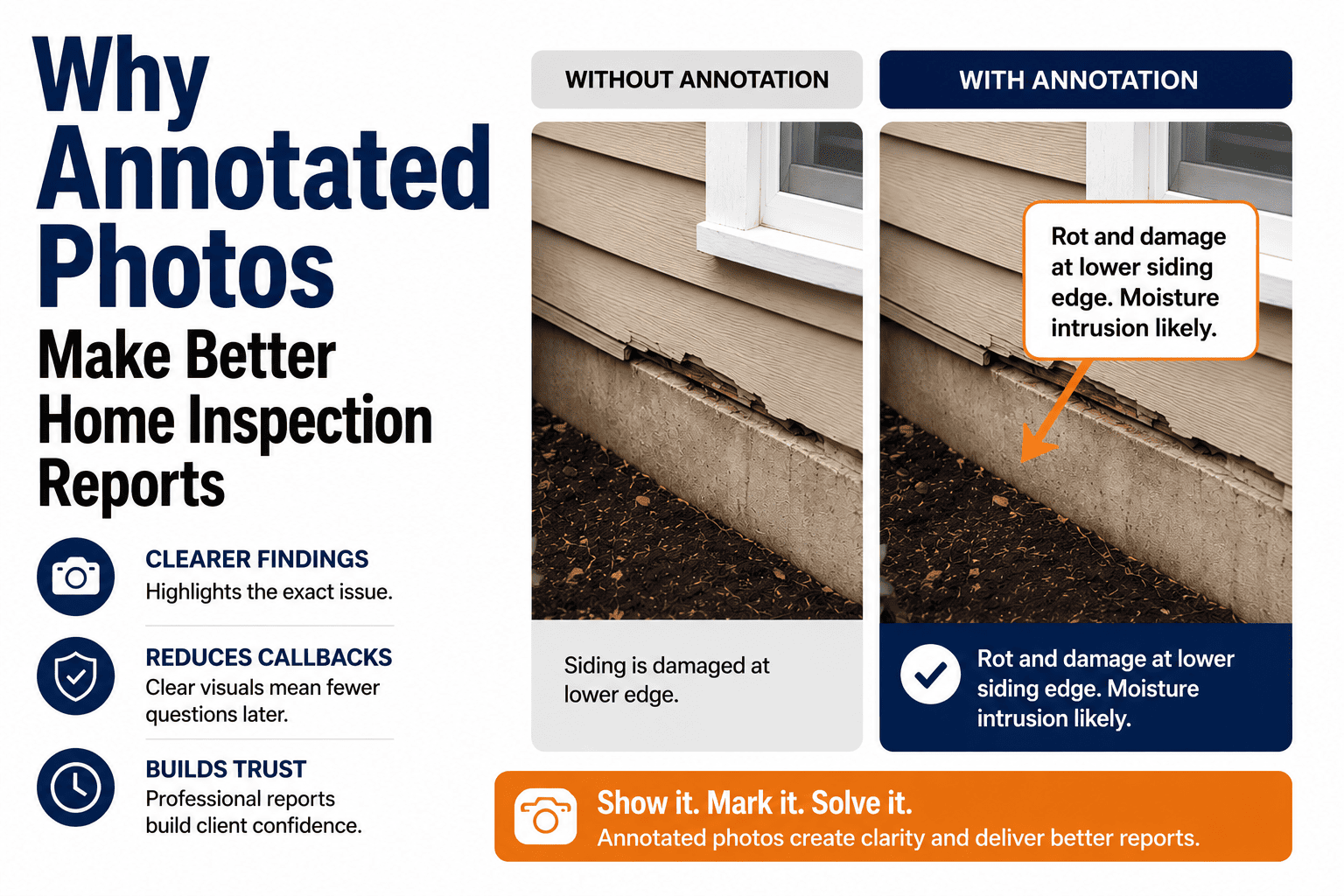
The difference between a defensible inspection report and a liability waiting to happen often comes down to one thing: photos. Not just any photos the right photos, taken consistently, every single time. This systemby-system checklist ensures you never miss a critical shotwhether you're documenting a pristine new build or a 100-year-old fixer-upper.
Why a Photo Checklist Matters
Photos serve three critical purposes in every inspection. Understanding these helps you prioritize what to capture:
Legal Defense
Photos prove what you saw (and didn't see) on inspection day. When a client claims you "missed" something, your photos tell the real story.
Client Clarity
A picture eliminates confusion. Clients understand "crack in foundation wall" instantly when they see the actual crack.
Baseline Documentation
Photos create a record of condition at time of sale. Useful for warranty claims, insurance, and future comparisons.
Never miss a required photo again. HomeInspecto's guided workflow prompts you for each essential photo as you inspect. Schedule a demo →
Three Types of Photos Every Report Needs
A complete inspection uses all three photo types strategically:
Overview/Context Photos
Wide shots that establish location and general condition
When: Start of each section/area
Component/Data Photos
Equipment details, labels, and identification info
When: Every major component
Defect/Condition Photos
Close-ups of issues, damage, or concerns
When: Every defect found
Complete Photo Checklist by System
Use this master checklist to ensure complete documentation. Items marked Required should be captured on every inspection; others as conditions warrant.
Exterior
8-15 photosRoofing
6-12 photosElectrical
8-15 photosPlumbing
10-18 photosHVAC
8-14 photosStructure/Foundation
6-12 photosAttic
5-10 photosInterior/Rooms
10-20 photosGarage
4-8 photosAppliances
4-10 photosPhoto Documentation Pro Tips
Context → Close-up
Always take a wide context shot first, then the close-up. This helps clients understand where the defect is located.
Voice Notes On-Site
Dictate photo descriptions as you shoot. "Basement east wall, horizontal crack, about 4 feet up" is faster than typing later.
Include Reference Objects
Place a ruler, pen, or your hand next to cracks for scale. "1/4 inch crack" means nothing without visual proof.
Good Lighting Matters
Use your phone's flashlight or carry a work light. Dark, blurry photos are worse than no photos at all.
Photo What You Can't Access
Blocked areas, locked rooms, storage covering items—photograph these to document WHY you couldn't inspect something.
More Is Better
Storage is cheap; lawsuits aren't. Take 100+ photos per inspection. Delete nothing until well past any statute of limitations.
Automatic photo organization by system. HomeInspecto sorts photos into the correct report sections as you capture them. Start your free trial →
Quick Reference: Minimum Photos by Property Type
| Property Type | Minimum Photos | Target Photos | Time Estimate |
|---|---|---|---|
| Small Condo (< 1,000 sf) | 40-50 | 60-80 | 25-35 min |
| Average Home (1,500-2,500 sf) | 75-100 | 100-150 | 45-60 min |
| Large Home (3,000+ sf) | 100-125 | 150-200+ | 60-90 min |
| Multi-Family (2-4 units) | 125-175 | 200-300 | 90-120 min |
| Older Home (Pre-1960) | 100-150 | 150-250 | 60-90 min |
Swipe to see full table →
Frequently Asked Questions
How many photos should I include in the final report?
Include 30-60 photos in the delivered report—enough to document all major systems and defects without overwhelming clients. Keep ALL photos (100+) in your files for liability protection. The report shows the highlights; your archive protects you if questions arise later.
Should I photograph things that are normal/functional?
Yes! Photos of normal conditions prove what you inspected and its condition at time of sale. A photo showing a clean, dry crawlspace is just as valuable as one showing water damage—it documents baseline condition and protects you if problems develop later that didn't exist during your inspection.
How long should I keep inspection photos?
Keep photos for at least 7-10 years, or longer based on your state's statute of limitations for construction defect claims. Storage is cheap—use cloud backup. Many inspectors keep photos indefinitely. Delete nothing related to inspections; you never know when you'll need them.
What if I can't access an area to photograph it?
Photograph WHY you couldn't access it: the locked door, the stacked boxes blocking the panel, the insulation covering the attic access. This documents that the limitation existed, not that you skipped it. Note the limitation in your report alongside the photo.
Should I use my phone camera or a dedicated camera?
Modern smartphone cameras are excellent and integrate seamlessly with inspection apps. The best camera is the one you'll actually use consistently. Key features: good low-light performance, quick access, and easy transfer to your reporting software. Most inspectors use their phones successfully.
Photo Checklist Built Into Every Inspection
HomeInspecto guides you through required photos for each system, auto-labels as you capture, and organizes everything into your report.
- System-by-system photo prompts
- Auto-labeling by location
- Cloud backup included
- Instant report integration